

Aloha friends, in this video, I'm going to show you how to change the algorithm on your Facebook feed on the home page. It takes less than 30 seconds and it's going to dramatically change what you see on your feed.
So if you've ever been frustrated and thinking "Why do I see the same things over and over on Facebook? And why don't I see all my other friends show up in my feed?" This is going to show you why.
Now, I want you to do me a favor. If you find this video helpful, please subscribe to the channel by clicking this link. Feel free to share this with anybody as well.
You need to click the home button when you're on facebook.com. This is your home feed. Facebook will deliver you a feed that they think pertains to you, depending on what kind of stuff you engage with.
After a while it can be redundant and you feel like you're getting the same thing over and over. And you may be thinking, "Come on Facebook. What happened to all the other people that I'm connected with?"
Well, all you have to do is go over to the left-hand column and click the "Most Recent" tab and what'll happen is you'll notice everything is now showing in chronological order. This way, you get to see real time what's going on instead of what Facebook is deciding you should see.

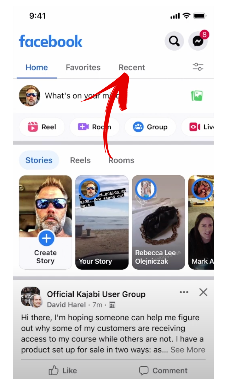
Now I'm going to go show you how to do this on your mobile device as well. I'm on an IOS Apple device. If you're on Android, it may be a little bit different, but this is how it looks on the iPhone.
So see at the top here, right? All you have to do is click recent.
Now, sometimes if you scroll down, you might lose the recent tab and can't see it. All you have to do is scroll down even further and then come back up.
Now you're getting all stuff that is just posted just now, and one minute ago. All this stuff is recent. It totally changes your Facebook feed.
Thanks for stopping by. If you found this helpful, do me a huge favor and share it with your Facebook friends. They'll be thrilled that you've shown them this. Take care and have a wonderful day.
